
Query Limits
A number of limits are imposed on the GraphQL endpoint in order to ensure stability and prevent resource exhaustion.
Rate limits on the number of HTTP requests permitted are enforced. See the Rate Limits documentation for further details.
Queries record information about how long it took to complete, the complexity of the query, how deep the query is, etc. Bipsync uses these for troubleshooting and general query analysis. This allows us to optimise the performance of queries and by imposing limits we can ensure unexpected queries do not reduce availability of the platform.
This is important because there are some limits to what GraphQL can achieve. Complex queries or those which go beyond the max depth will result in an error being returned from the endpoint.
- The maximum depth allowed is 13.
- The maximum complexity score allowed is 60000.
- The maximum execution time is 5000ms.
- The maximum request size is 1mb.
- The maximum response size is 10mb.
Example Query
In order to work through some examples we'll use this example query
{
  users (first: 10) {
    edges {
      node {
        name
        research (first: 25) {
          edges {
            node {
              title
            }
          }
        }
      }
    }
  }
}
Running this produces output along the lines of (data section is folded for brevity)
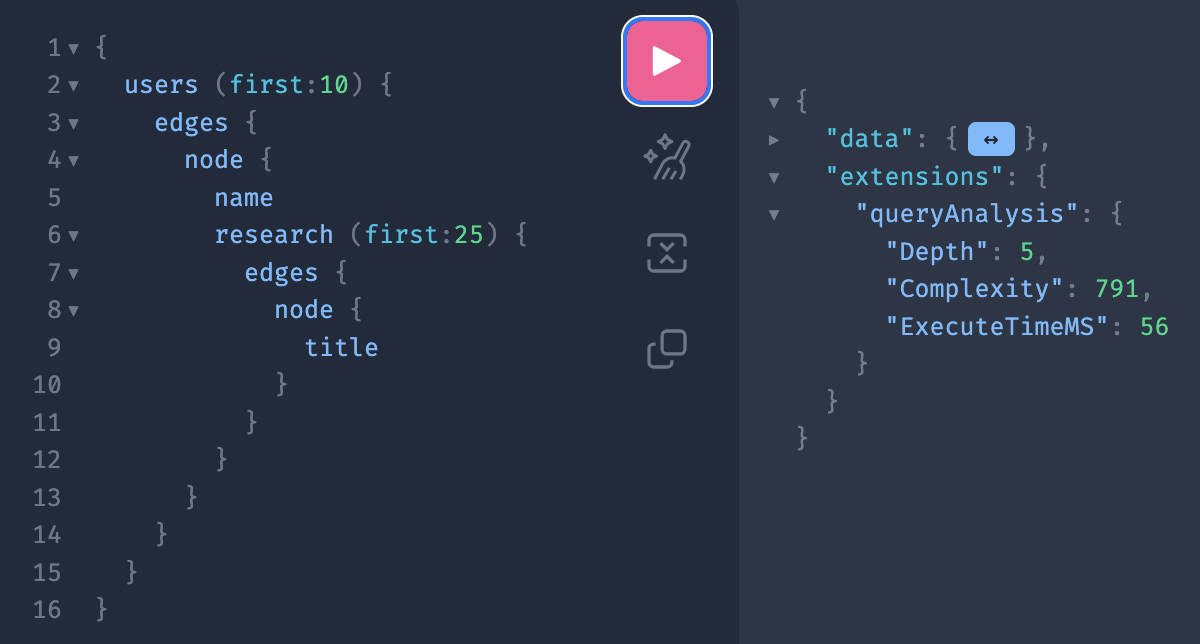
Note the extensions->queryAnalysis section, these are the result of the depth and complexity analysis as well as the execution time
Query Depth
Using the query above as an example, the depth is reportee as 5. This is calculated as
- A depth of 2 for the topmost query (Query->users)
- The Research->edges->node structure inside that adds a further depth of 3.
- Total depth is 2 + 3 = 5
This analysis is performed before the query is run and so any excessive depth queries will not attempt execution at all.
Reducing Query Depth
- Although multiple level queries can be very powerful they can also be very intensive to execute. Use them sparingly.
- You should be able to chain together around 4 levels of query->subquery before you exceed the depth limits.
Query Complexity
Using the above query as an example, the complexity is reported as 791. Starting at the inner most node this is calculated as;
- The user->research node has a cost of 3 (2 for the connection and 1 for the "title" field)
- With a maximum limit of 25 nodes this makes the total for user->research to be (3 * 25) for the edges and 1 for the query, so 76 in total
- The users->node has a cost of 79, two for the connection, one for the name field and 76 for the research lookup
- With maximum of 10 users the users->edges has a cost of 79 per node for 10 nodes so 790
- Finally the base query is 1 point plus the 790 for the users connection which produces a grand total of 791
This analysis is performed before the query is run and so any excessively complex queries will not attempt execution at all.
Reducing Query Complexity
- Try to be a precise as you can with filters and queries, graphql is most efficient when you use it to get a single or small number of records rather than getting everything
- Keep the first: values small, the default is 25 but up to 50 can be requested. Heavily nested queries with high first: values will very quickly generate high complexity values
- Don't ask for fields unless you need them
Timeouts
In the above example the query took 56 milliseconds to run. This is dependant on many factors including the amount of data returned, your network connection, load on the system and so on. In this example it is well under the limit of 5000 milliseconds. If a query exceeds this limit it is terminated but may still return any data that it has already generated. The data won't be complete but may be useful in working out how far the query got. In general any query getting anywhere near the 5000 milliseconds limit is probably not efficient and needs reworking.
Reducing Timeouts
Small queries are generally quicker, make use of the filtering and don't request fields you don't need.
Request and Response Size
Request and response sizes are limited to 1MB and 10MB respectively. If a query exceeds the request size it will be refused and will not execute. Any response exceeding the limit will be terminated, partial results may be returned depending on the nature of the query.
Reducing Request and Response Sizes
- Whitespace counts towards request sizes so while its good for readability it can bulk up your request. It makes no difference to the query speed.
- Large fields like text fields or images can quickly eat up response sizes, consider if you need such fields particularly when extracting lots of documents
Updated 6 months ago