
Receiving SQS Notifications from Rules
Some clients wish to be notified when certain rules are triggered, and a useful way to consume such events is via an integration with Amazon's SQS service. It's a very secure, scalable way to receive updates from Bipsync as data changes in the system.
Before notifications can be received, some setup has to be performed in the clients' AWS account.
-
Create an SQS queue
The client creates the SQS Queue in their AWS account. It's essential that the queue is a FIFO queue, but otherwise there are no other requirements on the queue. You can tell if it's a FIFO queue because the queue name will have '.fifo' at the end of it. -
Add a Policy to the queue
A policy like the one below then needs to be added to the queue to grant Bipsync the ability to find and post to it.
{
    "Version": "2012-10-17",
    "Id": "allowBipsync",
    "Statement": [
        {
            "Effect": "Allow",
            "Principal": {
                "AWS": "<IAM identifier>"
            },
            "Action": [
                "sqs:SendMessage",
                "sqs:GetQueueUrl"
            ],
            "Resource": "<queue arn>.fifo",
            "Condition": {
                "StringLike": {
                    "aws:PrincipalArn": "<IAM identifier>"
                }
            }
        }
    ]
}
Note the <queue arn> and <IAM identifier> placeholders above. These will need to be replaced with appropriate values. The former will be the ARN of your queue, and the others can be provided by Bipsync upon request.
For example:
{
    "Version": "2012-10-17",
    "Id": "allowBipsync",
    "Statement": [
        {
            "Effect": "Allow",
            "Principal": {
                "AWS":"arn:aws:iam::987654321:root"
            },
            "Action": [
                "sqs:SendMessage",
                "sqs:GetQueueUrl"
            ],
            "Resource": "arn:aws:sqs:us-east-1:123456789:BipsyncProd.fifo",
            "Condition": {
                "StringLike": {
                    "aws:PrincipalArn": "arn:aws:iam::987654321:role/demo*"
                }
            }
        }
    ]
}
Notify the Bipsync team once this configuration is in place. Bipsync will then need to make some changes to our own AWS infrastructure before the queue is able to receive messages.
Working with Encrypted QueuesIf your SQS queue has been encrypted with a custom KMS key, you will need to add Bipsync's IAM user ID to the list of AWS accounts that are allowed to use the key. Bipsync will also need to make adjustments to our own access policies to reflect this, so please let us know if you are using or plan to use KMS with your SQS queue.
Configuring a Rule to send SQS Messages
Create a new rule and select a "Send SQS message..." action:
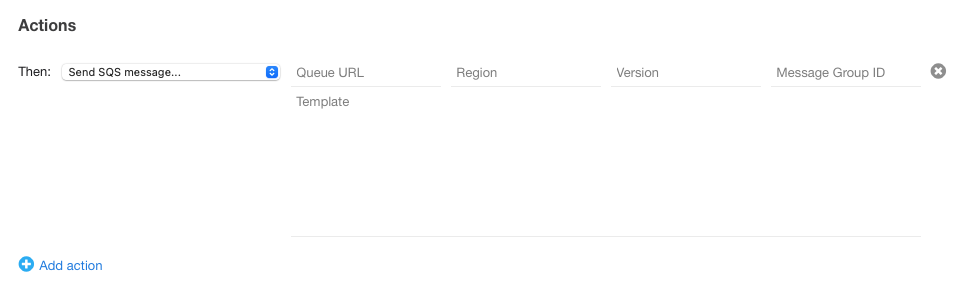
The following parameters need to be supplied:
- Queue Url: This is the URL to the queue, for example https://sqs.us-east-1.amazonaws.com/83592614837291/BipSyncNotesQueue.fifo
- Region: This can usually be deduced from the URL, e.g. us-east-1
- Version: This is usually "2012-11-05", though it may change in the future
- MessageGroupId: this is used to group messages within the queue. This is arbitrary, and can be used by the client to easily segregate the messages by rule, or by function.
The template parameter represents the message payload that will be sent to the queue. It can contain placeholders that will be substituted for appropriate values when the message is sent. The exact format of the template can be determined by the client, but here's an example of a template for a message that should be sent when a note is updated:
{
  "data": {
    "CrudOperation":"UPDATE",
    "type":"notes",
    "attributes": {
      "effectiveDate": "{{ document.created.sec }}",
      "updateDate": "{{ document.updated.sec }}",
      "updatedById":"{{ document.updatedBy.user._id }}",
      "updatedById":"{{ document.updatedBy.user.name }}",
      "title": "{{ document.title }}",
    },
    "author": {
      "data": {
        "type":"system-users",
        "id":"{{ document.user.name }}"
      }
    }
  }
}| Placeholder | Value |
|---|---|
| document.title | The title of the note. |
| document.created.sec | A UNIX timestamp that reflects the time the note was created, in the UTC timezone. |
| document.updated.sec | A UNIX timestamp that reflects the time the note was last updated, in the UTC timezone. |
| document.user.name | The name of the user who created the note. |
| document.updatedBy.user._id | The ID of the user who last updated the note. |
| document.updatedBy.user.name | The name of the user who last updated the note. |
Other properties are available. If there are any particular properties you'd like to use in your message payloads, please enquire with a Bipsync CSM.
Updated about 2 months ago