
The Exchange Sync Process
How Bipsync communicates with Microsoft Exchange to sync data
Bipsync uses Microsoft's EWS Managed API to sync Exchange data. This is a SOAP API, and so all communication happens over a SSL connection via HTTPS.
The API is available in the following versions of Exchange:
- Exchange 2007 Service Pack 1
- Exchange 2010
- Exchange 2010 Service Pack 1
- Exchange 2010 Service Pack 2
- Exchange 2013
- Exchange 2013 Service Pack 1
- Exchange 2015
- Exchange 2016
We use basic authentication to connect to Exchange, using the credentials of an Exchange user that has been provided to us by the Exchange controller. We'll refer to this user as a "sync user".
The sync user should be given the minimum permissions necessary to fetch the data that is required. Depending on the use case, this involves different approaches.
Syncing meetings
In order for meetings to be synced to Bipsync, we ask that the sync user is copied in on the attendee list for each meeting. This will result in the meeting being added to the sync user's calendar. That user should have permission to read their calendar, which allows us to then sync these meetings to Bipsync.
This is a good strategy for syncing meetings that are created by people outside of the organisation, e.g. by brokers for Expert Network meetings.
Syncing contacts and appointments
Contacts and one-off appointments can be synced to Bipsync by adding them to a shared folder/calendar. These can be selected for sync when configuring Exchange Sync in Bipsync's Setup app.
This is a good strategy for syncing objects that are created by users within the organisation.
Bipsync/Exchange Communication
On a timed interval, which is configurable but set to one minute by default, Bipsync will poll Exchange for the latest data.
It does this by passing a Sync Token, which is used by Exchange to determine a delta of changes since the last sync. If no Sync Token is passed, then Exchange assumes no previous sync has occurred, and replies with the full set of data that the client needs.
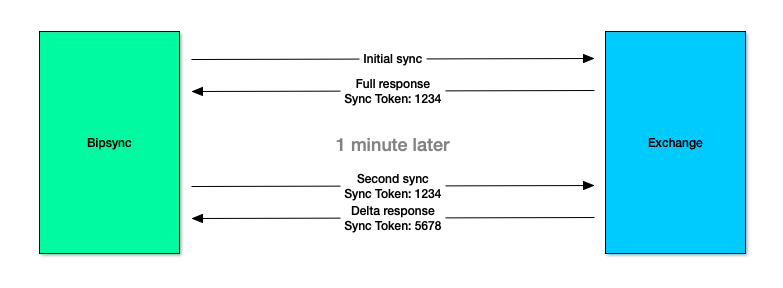
One-way data sync between Bipsync and Exchange.
Object OwnershipContacts and calendar events that are synced need to be owned by a user in Bipsync to be visible to other users in the team. To do this, a user in Bipsync has to be nominated as the 'owner' of the synced objects. This user could be a client user on the team, or it could be a generic 'sync' user that can be created purely for this purpose.
Contacts
Contacts can be synced by sharing them to one or more public folders to which the sync user has access.
When these folders have been specified, Bipsync will maintain copies of the contacts in its database, and keep them in sync with changes made in Exchange or Outlook.
No changes can be made to the synced contacts in Bipsync. Changes can still be made to contacts created natively in Bipsync.
The following Exchange attributes of a contact will be synced:
- DisplayName
- CompanyName
- JobTitle
- BusinessHomePage
- PhoneNumbers
- MobilePhone
- BusinessPhone
- HomePhone
- BusinessFax
- EmailAddresses
- EmailAddress1
- EmailAddress2
- PhysicalAddresses
- Business
- Home
We do not currently support the syncing of custom attributes for contacts.
Calendar Events
Calendar events can be made available for sync in one of two ways:
- Adding them to the sync user's calendar
- Sharing them to one or more shared calendars which the Bipsync exchange user has access to
Adding events to the sync user's calendar involves simply adding them to the attendee list when setting up a meeting invite. The user does not have to explicitly accept the invite for the event to be available to Bipsync. This option is more appropriate for meetings, especially those that are arranged by third parties who do not have access to shared calendars.
Alternatively, events can be created within a shared calendar, which exists within a public folder. Bipsync can be configured to read all events within this shared calendar. This option is more appropriate for internal events that are not necessarily meetings, but are suitable for display on a calendar (e.g. national holidays).
When these folders have been specified, Bipsync will maintain copies of the events in its database, and keep them in sync with changes made in Exchange or Outlook.
No changes can be made to the synced events in Bipsync. Changes can still be made to events created natively in Bipsync.
The following Exchange attributes of an event will be synced:
- Subject
- TextBody
- Start
- End
- IsAllDayEvent
- IsCancelled
- Recurrence
Since we sync the Recurrence attribute, we do support recurrence patterns for events, e.g. "Annually", "First Thursday of the Month", "Weekly but not on the first Friday of the Month", etc.
We do not currently support the syncing of custom attributes for events.
Updated about 1 year ago